
Yesterday an office colleague asked me if standard Excel can handle this scenario:
- to send a single Excel workbook with multiple sheets to multiple users
- each sheet has some data for a different user
- each user can access only its own sheet (by password), they cannot view other sheets
- each user fills some feedback in its own sheet and then sends it back to the manager
- only the manager can see all sheets in the workbook
Standard Excel cannot solve this scenario, however, it can be done with some VBA help.
First step: you have to create an excel workbook with a structure as in the image below: one sheet "LogIn" where you create the four columns, one sheet "Instructions" and several sheets with user data (in this example, 3404, 9020, 9012).
If you open the file with the manager username and password, you will have access to all sheets. If you enter as a user (ex. 3404), you will only have acces to your user sheet (3404) and the Instructions sheet.

Second step: you open the Developer tab (ALT + F11) and copy the code below in the code window of ThisWorkbook:
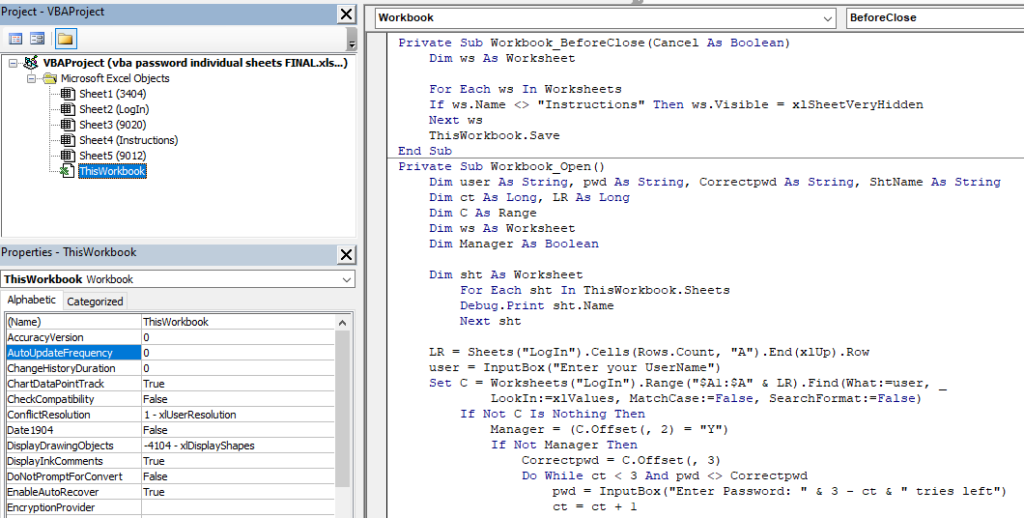
Private Sub Workbook_BeforeClose(Cancel As Boolean)
    Dim ws As Worksheet

    For Each ws In Worksheets
    If ws.Name <> "Instructions" Then ws.Visible = xlSheetVeryHidden
    Next ws
    ThisWorkbook.Save
End Sub
Private Sub Workbook_Open()
    Dim user As String, pwd As String, Correctpwd As String, ShtName As String
    Dim ct As Long, LR As Long
    Dim C As Range
    Dim ws As Worksheet
    Dim Manager As Boolean

    Dim sht As Worksheet
        For Each sht In ThisWorkbook.Sheets
        Debug.Print sht.Name
        Next sht

    LR = Sheets("LogIn").Cells(Rows.Count, "A").End(xlUp).Row
    user = InputBox("Enter your UserName")
    Set C = Worksheets("LogIn").Range("$A1:$A" & LR).Find(What:=user, _
            LookIn:=xlValues, MatchCase:=False, SearchFormat:=False)
        If Not C Is Nothing Then
            Manager = (C.Offset(, 2) = "Y")
            If Not Manager Then
                Correctpwd = C.Offset(, 3)
                Do While ct < 3 And pwd <> Correctpwd
                    pwd = InputBox("Enter Password: " & 3 - ct & " tries left")
                    ct = ct + 1
                Loop
                If pwd = Correctpwd Then
                      Worksheets(CStr(C.Offset(, 1).Value)).Visible = True


                Else
                    MsgBox "Incorrect manager password, access to INSTRUCTIONS only"
                End If
            Else

                            For Each ws In Worksheets

                            ws.Visible = True
                            Next ws
            End If
        Else
            MsgBox "Not a valid user, access to Instructions only"
        End If
End Sub
And that's all!
In case you need a working Excel VBA template with all the features discussed above, ready for you to modify based on your needs, just send me an email - see the Contact page.
If you want to see a short video with each step involved, I have also created a short tutorial on my Youtube channel "Data Analytics Central":
Enjoy!